New from Diskel Pegasus Authorised Developer

AutoApprovalsApproval Workflows for Pegasus Opera 3

AutoApprovals adds the structured sign-off processes that Opera 3 doesn't have built in. No more chasing by email, phone or paper. Integrated with Microsoft Teams, Outlook and SharePoint.

Works with all versions of Opera 3Compatible with Opera 3, Opera 3 SQL and Opera 3 SE — no upgrade required to add approval workflows.

Integrated with Microsoft Teams and OutlookApprovers receive notifications and can review and sign off directly from Teams or Outlook — no need to log in to Opera 3.

Structured workflows your team will actually followDefine approval chains, escalation rules and thresholds once — AutoApprovals handles the routing, chasing and sign-off automatically.

Full audit trail with SharePoint document storageEvery approval decision is logged and stored. Complete visibility over what was approved, by whom and when — built in as standard.

Key features

Everything AutoApprovals does for your Opera 3 team

AutoApprovals adds the structured sign-off processes that Opera 3 doesn't have built in — from configuring your approval chains to notifying approvers and capturing a full audit trail automatically.

Approval workflows

  • Configure workflows to match your existing business rules
  • Set value thresholds and spending limits per approver
  • Multi-approver chains and escalation rules
  • Supports purchase invoice and purchase order approval
  • Automatic routing — no manual chasing required
  • Works with all versions of Opera 3, SQL and SE

Microsoft 365 integration

  • Approvers notified automatically via Microsoft Teams or Outlook
  • Approve or reject directly from Teams or email — no Opera 3 login needed
  • Approval documents stored securely in SharePoint
  • Live approval status visible at a glance in SharePoint
  • Approve from anywhere — office, home or mobile
  • Works alongside AutoFiling for end-to-end document management

Audit trail & control

  • Full audit trail on every approval decision — who, what and when
  • Eliminates unauthorised spending and rogue purchases
  • Complete visibility of where every request stands
  • Replaces scattered email chains and paper sign-off sheets
  • Developed by Diskel — Pegasus Authorised Developers
  • Minimal training required — simple, intuitive interface
Supported approval types

AutoApprovals can be configured to handle sign-off workflows across the following areas.

Purchase invoices Purchase orders Credit notes Expense claims Multi-approver chains Value-based thresholds Escalation rules
Approval workflows

Three approval Systems.The choice is yours.

AutoApprovals* covers the key areas where Opera 3 businesses need formal sign-off processes.

Purchase Order Approvals

Ensure spend is authorised before it's committed. Orders sit as Uncommitted Documents until approved, then automatically progress to full Purchase Orders. Set value limits per approver and add multiple authorisers to a single workflow.

  • Authorisers don't need an Opera 3 login
  • Value limits per authoriser
  • Comments and full audit trail

Purchase Invoice Approvals

Route supplier invoices to the right people automatically. Approvers can see the general ledger and job analysis relating to the invoice, so decisions are made in context - without delays or back-and-forth.

  • Automatic routing to the right approver
  • GL and job analysis visible at point of approval
  • Reportable audit trail

BACS Authorisation Approvals

AutoApprovals now covers BACS payment authorisation too, bringing the same structured workflow and audit trail to outgoing payments, with the same Teams and Outlook notifications your team already use.

  • Structured authorisation before payment runs
  • Same workflow and audit trail as PO and invoice approvals
  • Approve via Teams or Outlook — no Opera 3 login needed
BACS payment approvals
Benefits

Why businesses use AutoApprovals

Financial control

Clear visibility and control over what's being requested and spent, before it's committed.

Faster turnaround

Automated notifications alert approvers the moment action is needed, cutting delays and bottlenecks.

Approve from anywhere

Act via Teams or Outlook on any device. No VPN, no Opera 3 login required.

Fewer errors

A formal review step before spend is committed reduces mistakes and duplicate payments.

Full audit trail

Every approval, rejection and comment is recorded and stored — easy to report on and compliant by design.

Consistent process

Everyone follows the same steps regardless of team, making compliance simpler and onboarding easier.

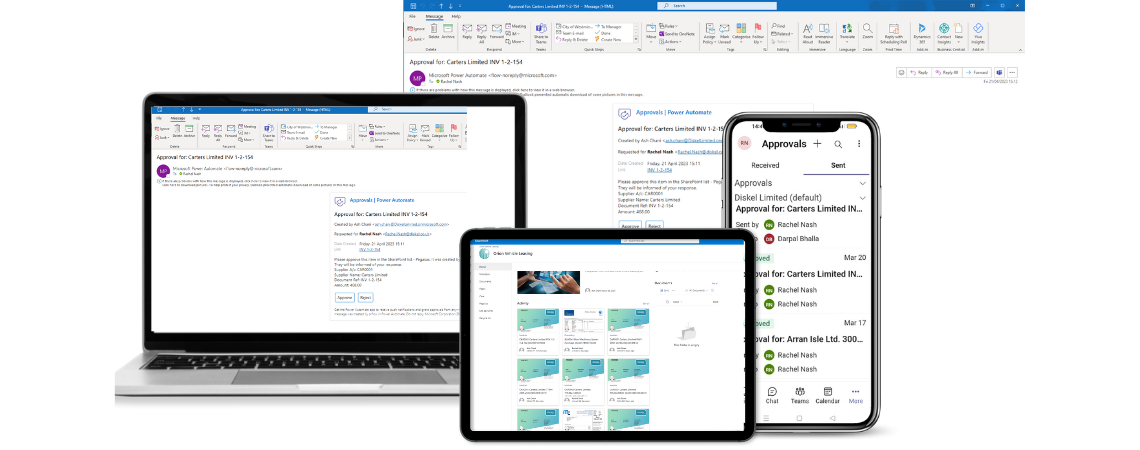
AutoApprovals on mobile, laptop and Outlook
How it works

Configured for your business. Automated from there.

AutoApprovals* is set up specifically for you, who approves what, up to what value, and in what order. Once configured, the process runs automatically. Approvers receive a notification in Teams or Outlook, review the details, and approve or reject without ever needing to open Opera 3.

Authorisers don't need an Opera 3 licence. Purchase orders sit as Uncommitted Documents until signed off, then progress automatically. Every action is recorded and stored in SharePoint.

Microsoft Teams Outlook SharePoint Opera 3 & Opera 3 SE
See it in action

Watch the AutoApprovals overview

This video walks through how approval workflows operate inside Opera 3 and how approvers act via Microsoft Teams and Outlook. Note: BACS authorisation approvals were added after this recording.